
Google Business Profile Recurring Posts Make Local Posting Easier for Businesses
Google Business Profile recurring posts help businesses keep evergreen updates active with less manual work while still supporting a fresh local presence. Here's what the feature does and how to use it strategically.
Google Business Profile recurring posts help businesses keep evergreen updates active with less manual work while still supporting a fresh local presence. In accordance with the rollout of native post scheduling late last year, Google has now officially added a Recurring Posts feature directly inside the Google Business Profile dashboard. For local businesses working to stay competitive in local search results, this is a meaningful development.
For small businesses, service providers, and multi-location brands, this is a meaningful update. It reduces the need for third-party local social scheduling tools and makes it easier to handle Google Business Profile activity with less manual effort. If you work with a full-service digital agency, this is the kind of ongoing optimization that compounds over time.
What the Recurring Posts Feature Does
Standard post scheduling allows businesses to choose a specific date for a one-time post. Recurring Posts take that a step further by allowing a single post to be published repeatedly on a set schedule.
When creating a post — whether it is an Update, Offer, or Event — businesses can now use a Repeats dropdown. The available options include Weekly, Monthly, or a Custom Schedule, such as "every first Tuesday of the month."
This matters because freshness plays an important role in how a Google Business Profile appears to users. Google typically archives posts from the main profile carousel after several months. With recurring posts, evergreen content can automatically return to the front of the profile, helping the business appear active and relevant rather than outdated or neglected. A well-maintained profile works hand-in-hand with a strong business website to convert local searchers into customers.
Who Can Benefit Most from Recurring Posts
Small business owners can benefit from this feature when running out of time to post consistently. By setting up recurring content, they can maintain a steady presence on their profile without adding another task to their weekly schedules. This is especially true for businesses that rely on organic local search visibility rather than paid advertising alone.
Service-based businesses with regular events or promotions can also use it well. For example, a gym can promote a weekly class, a restaurant can highlight a standing Tuesday special, or a clinic can share details about monthly health screenings.
Multi-location brands may see this as one of the biggest time-saving tactics. Recurring Posts make it easier to keep messaging consistent across several business profiles without manually creating the same update for every location each time. If you manage multiple locations and want a cohesive local SEO strategy, recurring posts are one piece of a larger system.
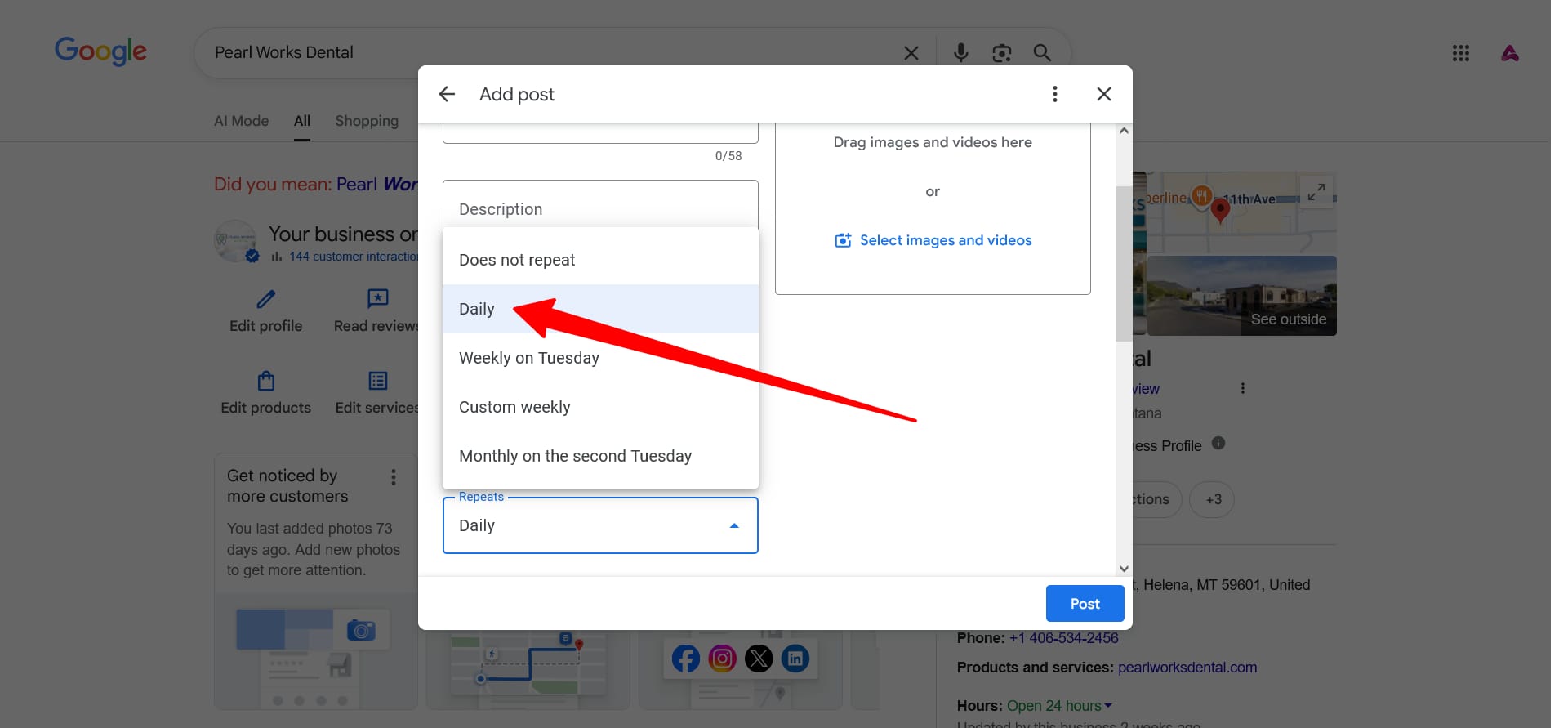
How to Set Up Recurring Posts on Google Business Profile
To create a recurring post, open your Google Business Profile through Google Search or Maps. Then:
- Click Add Update (or Posts).
- Draft your post with a high-quality image and a Call to Action button.
- Toggle on Schedule this post.
- Select your frequency from the Repeats dropdown.
- Hit Post.
Not sure what to post? A strong recurring content strategy starts with knowing your audience and your core value propositions — the same foundation behind any effective conversion optimization effort.
Best Practices for Using Recurring Posts
- Recurring Posts work best for evergreen content — messages that stay true over time, such as "24/7 Emergency Service," "Free Initial Consultation," or "Family-Owned Since 1987." These posts remain relevant to new visitors and can continue supporting the profile month after month.
- A good rule to follow is the 70/30 approach. Around 30% of GBP content can be recurring evergreen posts, while the remaining 70% should still include fresh, manual updates such as recent project photos, seasonal offers, team news, or event recaps. The same principle applies to a well-rounded SEO content strategy.
- Recurring Offers can also be used strategically. Standing discounts, first-time customer promotions, loyalty rewards, or veteran pricing can be scheduled to repeat monthly, keeping the "View Offer" button visible to people who discover a business through Google Search or Maps. For businesses running paid search campaigns alongside organic efforts, consistent offer messaging across both channels reinforces trust.
- Images matter as well. Businesses should use real, high-quality photos instead of stock images. Authentic photos of the team, storefront, services, products, or completed work make posts feel more trustworthy and relevant. The same philosophy drives the visual standards behind our website design work.
Final Thoughts
Google Business Profile Recurring Posts will not replace a thoughtful local content strategy, but they can make profile management much easier. For businesses that lose momentum simply because no one remembers to post regularly, this feature removes one of the biggest barriers to staying active digitally.
For agencies and managers handling multiple locations, the time savings can be especially valuable. By setting up strong evergreen posts, continuing to publish timely updates, and using real business photos, brands can keep their Google Business Profile fresh while reducing repetitive manual work. To see how GBP fits into a complete local presence strategy, get in touch with the Ruby Shore team or explore more insights on local search, SEO, and digital marketing.
Want help making your Google Business Profile work harder?
Talk to the Ruby Shore team about a local SEO strategy built for your market and your goals.