

Website Privacy Demand Letters Are Rising. Here Is What Business Owners Should Know.
CIPA demand letters are putting business websites under legal scrutiny for common tools like analytics pixels, chat widgets, and tag managers. This is what the risk actually looks like, and what your team needs to understand before a letter shows up.
Some business owners are opening their mail and finding something they never expected: a demand letter claiming their website broke a privacy law. Not because of a data breach. Not because of a hack. Because of tools they added on purpose: Google Analytics, an advertising pixel, a chat widget, a CRM script. Tools that may have fired before a visitor had a chance to say yes or no.
The claims are legally contested, and some of them feel like a shakedown. But the underlying problem is real. Most businesses have no clear picture of what their website is sending, to whom, or when. That gap is what creates the exposure.
Important: This article is for general information only and is not legal advice. Privacy laws vary by state, industry, data type, and business model. If you receive a demand letter or lawsuit threat, talk with your attorney before responding or making legal decisions.
Why CIPA demand letters are getting attention
A wave of demand letters and lawsuits tied to Vivek Shah and California's Invasion of Privacy Act — commonly called CIPA — has been making its way to businesses across the country. A public article from Jeffer Mangels Butler & Mitchell describes Shah as sending pre-litigation demand letters and filing lawsuits alleging that website search bars, forms, analytics tools, and advertising services transmit user information to third parties without prior consent.
The claims point to things that look routine from the inside: network requests, search terms, referrer URLs, session identifiers, IP addresses, device and browser data. The stakes are not small — California Penal Code Section 637.2 allows a private action for statutory damages of $5,000 per violation or three times actual damages, whichever is greater.
That does not mean every demand letter is valid. It does mean the stakes get attention.
What these letters are actually claiming
The core argument is that a website caused the visitor's browser to send data to outside companies before the visitor gave meaningful consent. Depending on what tools are running, that could include:
- Analytics requests sent to measurement platforms
- Advertising pixels used for remarketing or attribution
- Search terms entered into a website search bar
- Form behavior or field data connected to marketing systems
- Chat widgets and CRM tools that identify or profile a visitor
- Referrer URLs, page URLs, session IDs, device identifiers, or browser information
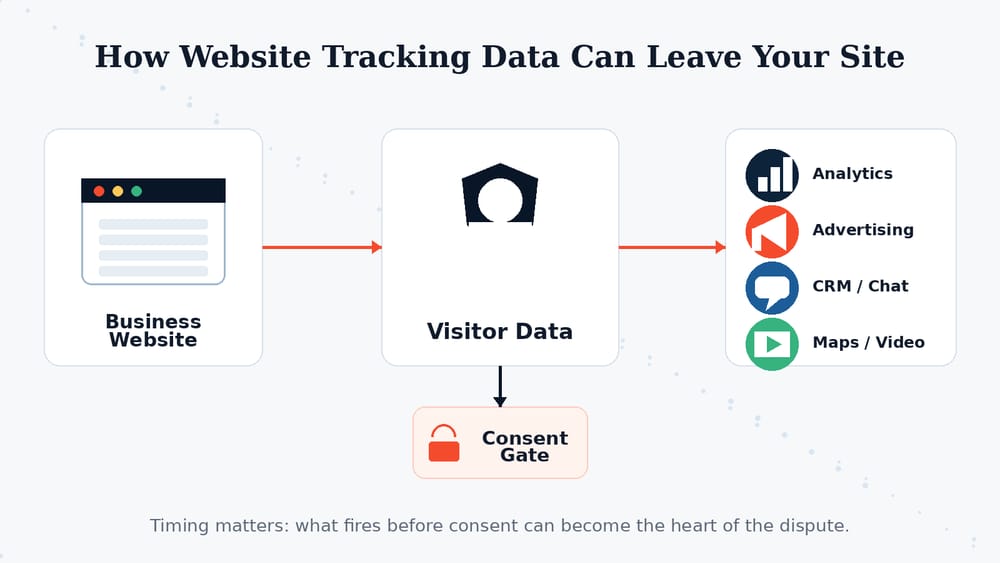
Most businesses do not intentionally create privacy risk. It usually happens because scripts and vendors are added over time without a clear consent and data-flow review.
The legal theory rests on how older privacy and wiretap statutes apply to modern website tools. A normal website request includes routing information because browsers and servers have to communicate. The dispute is over when ordinary commercial tools cross a legal line.
Why this is legally contested
CIPA was enacted in 1967. Google Analytics, Meta Pixel, HubSpot, Tag Manager, and chat widgets did not exist then. More recent California provisions address pen registers and trap-and-trace devices — Penal Code Section 638.51 generally prohibits installing or using a pen register without a court order unless an exception applies, including user consent.
Courts and lawmakers are still sorting out how far those older concepts should reach into modern web infrastructure. That uncertainty is what makes demand letters so disruptive. Even when a business has strong defenses, it still has to stop, investigate, talk to counsel, preserve records, and decide how to respond.
California SB 690 proposed changes that would create a commercial business purpose exception and clarify that certain commercial processes are not pen registers or trap-and-trace devices. Whether or not it passes, the fact that a bill was introduced shows lawmakers recognize that old privacy language is a poor fit for how websites actually work.
The real problem: most companies do not know what their website is sending
The legal fight belongs to attorneys. The website audit belongs to the business and its web team. And most businesses cannot answer basic questions about what their own site is doing:
- Which third-party scripts load on the site?
- Which are essential and which are marketing or analytics tools?
- Which fire immediately on page load?
- Which wait for a visitor to opt in?
- What data is sent to analytics, advertising, CRM, chat, video, map, or form vendors?
- Is Google Tag Manager being used, and who actually controls it?
- Does the privacy policy reflect what the website actually does today?
- Do mobile apps or embedded tools create additional tracking paths?
That is not because businesses are careless. It is because websites change. Marketing teams add scripts. Agencies add tags. Plugins pull in integrations. CRMs add tracking. Ad platforms add pixels. The privacy policy gets written once, then the stack keeps moving. This is the same ownership gap described in The Hidden Risk of Plugin-Dependent WordPress Websites — when nobody clearly owns the full system, these problems accumulate quietly until something forces them into the open.
What to do if you receive a privacy demand letter
This is not legal advice. But from a website operations standpoint, a calm and organized response starts here.
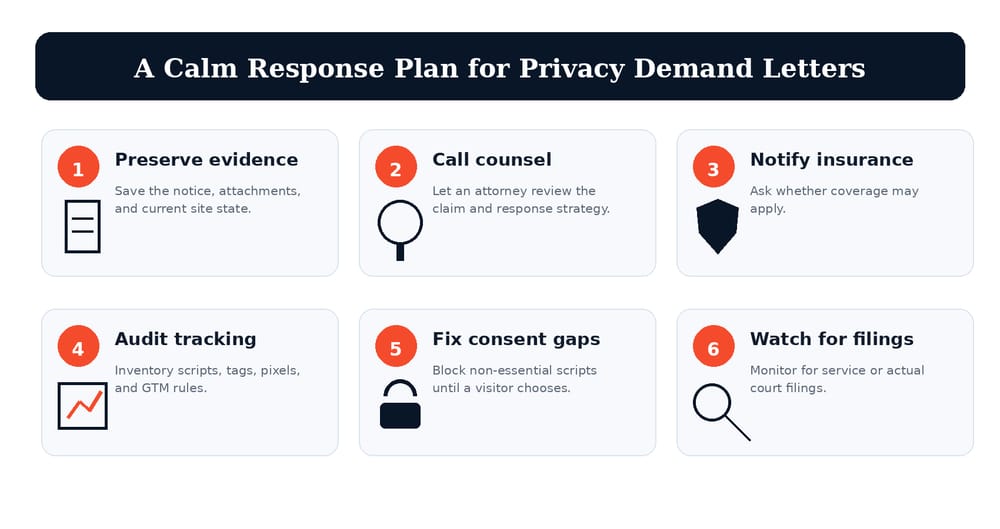
A calm response starts with preserving context, involving counsel, and understanding the current state of the website before making rushed changes.
1. Do not panic and do not start deleting things
The instinct to immediately pull tracking scripts, update the cookie banner, or rewrite the privacy policy is understandable. But your attorney may first need to preserve the current state of the site and understand exactly what was running when the demand was made. Act deliberately, not reactively.
2. Contact your attorney
The legal claims, deadline, venue, jurisdiction, and response strategy should be handled by counsel. Your web team can explain the technology clearly — but the attorney drives the response.
3. Notify your insurance carrier if appropriate
Cyber, media, technology, or general liability policies may require timely notice. Your attorney or insurance advisor can help decide whether and how to report it.
4. Preserve everything and document your setup
Save the demand letter, screenshots, the current privacy policy and cookie banner, tag manager settings, analytics configuration, plugin list, and any developer notes about what scripts were active.
5. Run a technical tracking audit
Your web team should identify which third-party services load, what requests are sent, whether scripts fire before consent, and which can be classified as essential versus non-essential. If you have a Managed Hosting & Support relationship, this is exactly the kind of task they should handle.
6. Fix consent where needed
A banner that says "we use cookies" is not the same as actually blocking non-essential scripts until a visitor makes a choice. If non-essential scripts are firing before consent, that needs to change.
How to reduce risk before a letter shows up
The businesses that handle this well are the ones that understood their website before a problem appeared. That does not mean running a massive compliance project. It means knowing what is running, why it is running, and whether the consent experience actually matches the tracking behavior.
Audit your scripts
Inventory analytics, pixels, chat tools, forms, embeds, CRM scripts, heatmaps, ad platforms, plugins, and tag manager containers.
Separate essential from non-essential
Basic site functionality is different from advertising, retargeting, audience building, behavior analytics, or profiling.
Control script timing
The risk often comes down to timing. Not just what loads, but whether it loads before the visitor has made any choice.
Keep policies current
A privacy policy should reflect what the website actually does. When the stack changes, the policy and consent setup may need to change with it.
None of this means abandoning analytics or marketing tools. Campaign measurement, retargeting, and conversion tracking still matter — and Online Marketing done well includes understanding how tracking connects to consent, not just adding pixels and moving on. The goal is a setup that works for the business and is defensible if it ever needs to be.
State privacy laws are not one-size-fits-all
California gets the attention, but the issue is not limited to California. Depending on where your business operates and who your website serves, your review may also need to account for laws in Virginia, Colorado, Connecticut, Utah, Texas, Oregon, Delaware, Iowa, Montana, Tennessee, New Jersey, Minnesota, and others.
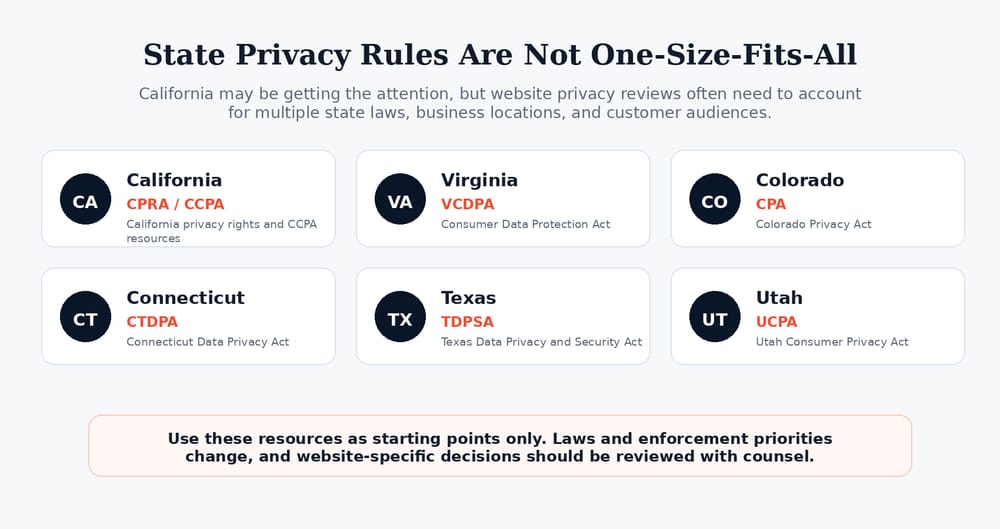
The right privacy posture depends on the states you serve, the data you collect, the vendors you use, and the business purpose behind that data use.
A privacy policy copied from another website is not enough. A cookie banner alone is not enough. The website, scripts, consent mechanism, policy, and legal review all need to line up. A business serious about Website Design and long-term credibility should treat the consent layer as a real part of the architecture — not something bolted on after the fact.
Ruby Shore's view
We are not a law firm. But we build and support websites, software, integrations, and marketing systems, and from that position the lesson is straightforward: a modern business website is a software system. It has dependencies. It loads scripts from outside vendors. It collects and transmits data. And if nobody on the team actually understands what it is doing, that is a business risk — not just a legal one.
Privacy and tracking are website architecture issues. They are marketing operations issues. They are long-term support issues. If your team cannot quickly answer what the site is sending and when, that needs to change before the next letter arrives. Ruby Shore brings together website, software, and marketing services so those decisions reflect the full picture.
The bottom line
You may not need to panic over every privacy demand letter — but you do need to understand your website's tracking, consent setup, and third-party scripts. For businesses that rely on their websites for marketing, leads, or customer communication, that is no longer optional.
Need to know what your website is actually loading?
Ruby Shore can help review your website, tracking scripts, consent setup, and marketing stack so you have a clearer picture before a demand letter shows up.
Useful official and legal resources
- California Penal Code Section 638.51 — pen register and trap-and-trace language
- California Penal Code Section 637.2 — civil action and statutory damages language
- California SB 690 — proposed commercial business purpose language
- California Office of the Attorney General — CCPA
- Virginia Consumer Data Protection Act
- Colorado Privacy Act resources
- Connecticut Data Privacy Act resources
- Texas consumer privacy rights
- Utah Consumer Privacy Act resources
Sources and further reading
- Jeffer Mangels Butler & Mitchell LLP: Vivek Shah CIPA Demand Letters Against Business Websites: How to Respond
- California Legislative Information: Penal Code Section 638.51
- California Legislative Information: Penal Code Section 637.2
- California Legislative Information: SB 690 — Crimes: invasion of privacy
- U.S. Department of Justice: California Man Sentenced in $122 Million Extortion Plot